

Free WavetableX Software |
|
 |
|
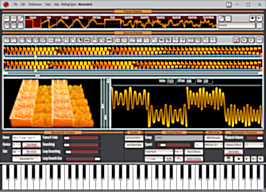
| WavetableX is a free wavetable synthesizer compatible with the Waldorf Blofeld. An optional Pro license unlocks additional features (see the Free VS Pro page for more details). | |
| Download File | WavetableX Windows MSI Installer |
| Available Upgrades | Pro license (29.99 USD) |
| Application Version | 1.0.14 |
| Release Notes | Version 1.0.14 • Added gamepad configuration settings for setting which controls create MIDI Volume Channel, MIDI Pitch Bend, and MIDI Mod Wheel modulation messages. These affect both WavetableX playback and Blofeld playback. • Fixed Wavetable Playback Mode not applying MIDI Mod Wheel input to control playing in WavetbleX when set to ModWheel. • Fixed MIDI/Pad Input Settings not being applied for Pitch Bend Semitones when a saved project is reloaded, until the user changes the settings. Click to see previous release notes.Version 1.0.13• Added Peak Normalize for Import Sound Mode. This allows normalizing without affecting DC offset of imported audio. • Renamed Wavetable Output setting Normalize to Peak Normalize to more accurately describe it's effect on the wavetable. • Added Wavetable Output setting Frame Normalize for setting how Wavetable Output setting Peak Normalize works, with the default being enabled (for backwards compatibility). • Added Resize Only option to Frame Repeat in Import Sound Mode. • Added duration UI fields for both wavetables and imported audio, showing how long their audio lasts. For wavetables, this is dependent on the wavetable's Speed setting. • Added Drive effects presets FadeIn and FadeOut. • Changed the default new project ADSR Envelope to use a standard Gate envelope. • Fixed a bug in the recent files menus not showing underscore characters. • Fixed MIDI input not working when WavetableX loses focus. Version 1.0.12 • Added support for importing WAV format wavetables. • Added auto-detection of frame size when importing Serum wavetables. • Added support for exporting Blofeld compatible SysEx files. • Made all exports use the project's name as the default filename with suffixes added (i.e., 'Project_Wavetable.syx', 'Project_SoundPatch.syx', etc.). • Renamed export menu 'Export Imported Frames to WAV File' to 'Export Wavetable Output to WAV File' to more precisely define it's action. Version 1.0.11 • Added Android WavetableX support for sending wavetable sets via Bluetooth to Android WavetableX for a portable solution to installing wavetables sets onto a Waldorf Blofeld. • Added file menu commands 'Export Audio Source to WAV File', 'Export Imported Sound to WAV File', and 'Export Imported Frames to WAV File' for use in Imported Mode.• Fixed a bug that could cause Imported Sound audio to be missing or wrongly offset when trimming an Imported Sound.• Fixed a bug that caused the view to not be reset when importing a sound or photo.Version 1.0.10 • New Wavetable Set Manager buttons Apply Defaults and Set As Defaults add the ability to load and configure default values for the Wavetable Set Manager. This allows you to allocate a region on the Blofeld for your custom wavetables, their sound patches, etc., and easily apply it to all sets you create or load. New built-in defaults use sound patch H100, wavetable slot ID 100, with multi program enabled at M100, and device ID set to 0. These new configurable defaults are app wide defaults and saved with the app's settings. • Improved the 3D wavetable view for all themes. • Improved the Psychedelic theme. • Fixed Normalize not working correctly for already normalized content, causing clipping. • Fixed the icon for the Replace Palette Frame button. Version 1.0.9 • Fixed license validation failure caused by the date in the license not matching the current Windows installation's cultural date format. Version 1.0.8 • Added additional details to error dialog windows. Version 1.0.6 • Fixed a bug causing some licenses to fail on some computers. Version 1.0.3 • Added Wavetable Set Manager button Project Details to open the selected project's Project Details window. • Added Wavetable Set Manager button Open Project to open the selected project in the main window of WavetableX. • Made Wavetable Set Manager double clicking of a project open the project in the main window of WavetableX instead of showing the project's Project Details window. • Made the main window of WavetableX unaffected by the Wavetable Set Manager. They now behave as 2 separate windows. • Made the Wavetable Set Manager stay alive as a completely separate window until WavetableX is closed. Closing the Wavetable Set Manager window now just hides it. • Added the ability to delete the Audio Source field from the Project Details window for projects that were originally Imported Sound projects. • Made upgrading keep the user's settings. • Fixed Imported Sound Details field Notes not being visible. • Fixed deleting the entire Imported Sound causing WavetableX to crash. • Fixed Project Details field Audio Source missing after accepting an Imported Sound. Version 1.0.2 • Fixed a bug in the Wavetable Set Manager causing sets created with version 1.0.1 to crash WavetableX. Version 1.0.1 • Added ability to extract and save projects in a wavetable set. • Added the ability for a content creator to lock the project details for Audio Source, License, and Copyright. • Fixed a bug where bypassing the playback effects caused the volume control to stop working. • Fixed a bug in the Wavetable Set Manager that could cause Save As to add an additional file extension. |
| Supported OS | Windows 10 or newer |
| Download WavetableX 1.0.14 | |
Free Android WavetableX: Blofeld Installer |
|
 |
|
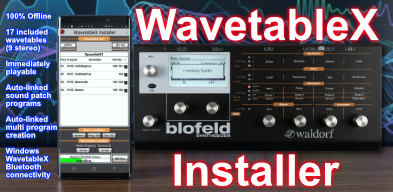
| WavetableX: Blofeld Installer is a free wavetable installer for Android designed for installing WavetableX wavetables onto a Waldorf Blofeld. See the WavetableX: Blofeld Installer page for more details. | |
| Application Version | 1.0.0 |
| Release Notes | Version 1.0.0 • First release on Google Play. |
| Supported OS | Android 7 or newer |
 |
|
Free WavetableX Wavetable Sets |
|
| WavetableX Wavetables Sets are free to use and install on a Blofeld using the free WavetableX software. No Pro license is required. | |
| These updated versions are designed for WavetableX 1.0.13 or newer. | |
| WHAT'S NEW: | |
| All wavetables now start at sound patch H100, wavetable slot ID 100, with multi program enabled at M100, and device ID set to 0. | |
| Several wavetables had unwanted clicks removed. Some wavetables had Blofeld effects set that did not match the effects in the Windows WavetableX app, and this has been fixed to match as intended. | |
Instruction Set 01 |
|
| Description | A collection of free wavetables for the Blofeld each with notes showing how each wavetable was created. This set is useful for learning how to create wavetables using WavetableX. From the WavetableX WAVETABLE SET MANAGER double click a wavetable in this set to open it in WavetableX as a project, then click INFO to view the notes containing the step by step instructions used to create the wavetable from scratch. Contents: • 8BitStream • RunnerX • SadSummit |
| Download Instruction Set 01 | |
Percussion Set 01 |
|
| Description | A collection of free percussion wavetables for the Blofeld created from real percussion instruments. Contents: • Bongo01 • KickBassDrum • BassDrumBent • BassDrum1_1-2 • BassDrum22 • SnareDrum • Snare2 • SnareNormal2 • Clap5 • ClapReverb |
| Download Percussion Set 01 | |
Bass Set 01 |
|
| Description | A collection of wavetables designed for bass. Contents: • BuzzingBass • DeepBass • WarpedBass |
| Download Bass Set 01 | |
Drive Echo Set 01 |
|
| Description | A collection of wavetables showcasing how Drive's preset Echo can be used to burn echo type effects directly into a wavetable. Contents: • AlienTwinkles • BattlingDragons • Echo • MeltingFigure |
| Download Drive Echo Set 01 | |
Space Set 01 |
|
| Description | A collection of wavetables designed for space music. Contents: • Ramen • CollidingArcs • FaultingVirus • Mesmorlin |
| Download Space Set 01 | |
Nightmare Set 01 |
|
| Description | A collection of eerie nightmare wavetables. Contents: • CrystalsOfDoom • InfectedDragon • MysticVault |
| Download Nightmare Set 01 | |